> ## Documentation Index
> Fetch the complete documentation index at: https://docs.matterai.so/llms.txt
> Use this file to discover all available pages before exploring further.
# Analytics
> MatterAI provides comprehensive analytics that help engineering teams gain insights into their development processes, code quality, and team performance. These analytics are designed to improve productivity, code quality, and overall engineering efficiency.
Analytics are available on all plans.
## PR Analytics
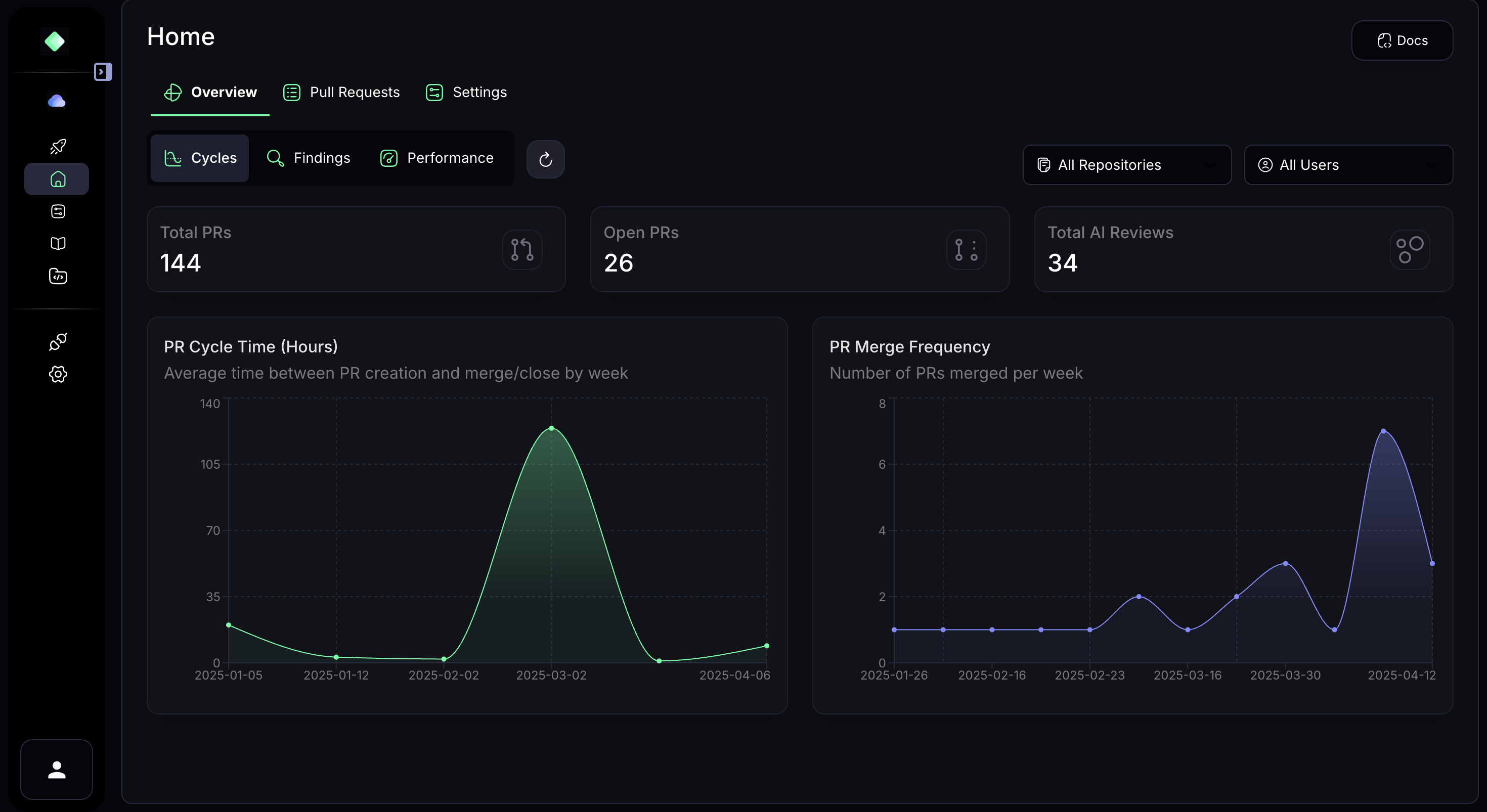
MatterAI tracks the lifecycle of pull requests to help teams optimize their development workflow and provides a high-level summary of key PR metrics across your repositories:
 ### Key Metrics
* **Total PRs**: The total number of pull requests across all monitored repositories
* **Open PRs**: The number of currently open pull requests requiring attention
* **PR Cycle Time**: Average time between PR creation and merge/close by week
* **PR Merge Frequency**: Number of PRs merged per week
* **Time Trends**: Visual representation of how PR metrics change over time
### Benefits
* **Immediate Visibility**: Get instant visibility into your team's development activity
* **Process Optimization**: Identify bottlenecks in your PR review process
* **Forecasting**: Predict development velocity based on historical data
* **Sprint Planning**: Use cycle time data to better estimate task completion
* **Continuous Improvement**: Track the impact of process changes on development efficiency
## Code Review Analytics
MatterAI provides detailed analytics on automated code reviews, helping teams understand the types of issues being detected and resolved:
### Key Metrics
* **Total PRs**: The total number of pull requests across all monitored repositories
* **Open PRs**: The number of currently open pull requests requiring attention
* **PR Cycle Time**: Average time between PR creation and merge/close by week
* **PR Merge Frequency**: Number of PRs merged per week
* **Time Trends**: Visual representation of how PR metrics change over time
### Benefits
* **Immediate Visibility**: Get instant visibility into your team's development activity
* **Process Optimization**: Identify bottlenecks in your PR review process
* **Forecasting**: Predict development velocity based on historical data
* **Sprint Planning**: Use cycle time data to better estimate task completion
* **Continuous Improvement**: Track the impact of process changes on development efficiency
## Code Review Analytics
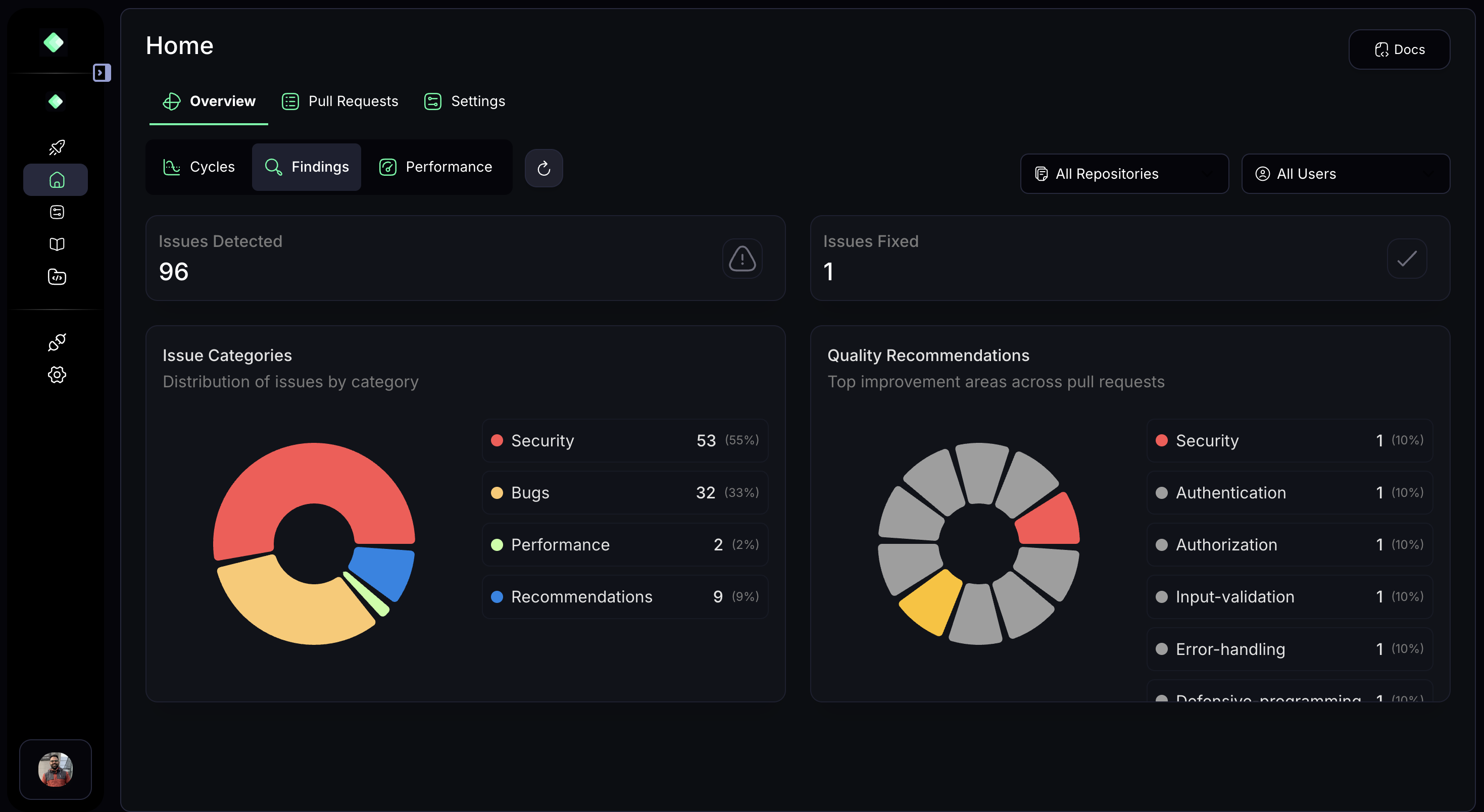
MatterAI provides detailed analytics on automated code reviews, helping teams understand the types of issues being detected and resolved:
 ### Key Metrics
* **Total AI Reviews**: The number of automated code reviews performed by MatterAI
* **Issues Detected**: Total number of issues found in your codebase
* **Issues Fixed**: Number of issues that have been resolved
* **Issue Categories**: Distribution of issues by category (Security, Bugs, Performance, Recommendations)
* **Quality Recommendations**: Top improvement areas across pull requests
### Benefits
* **Security Focus**: Quickly identify what percentage of issues are security-related
* **Prioritization**: Understand which categories need the most attention
* **Improvement Tracking**: See how your team is addressing different types of issues over time
* **Targeted Training**: Identify areas where your team might need additional training or resources
* **Resource Allocation**: Identify areas where your review process could be improved
## User Performance Analytics
MatterAI provides detailed metrics on individual developer performance to help identify strengths and areas for improvement:
### Key Metrics
* **Total AI Reviews**: The number of automated code reviews performed by MatterAI
* **Issues Detected**: Total number of issues found in your codebase
* **Issues Fixed**: Number of issues that have been resolved
* **Issue Categories**: Distribution of issues by category (Security, Bugs, Performance, Recommendations)
* **Quality Recommendations**: Top improvement areas across pull requests
### Benefits
* **Security Focus**: Quickly identify what percentage of issues are security-related
* **Prioritization**: Understand which categories need the most attention
* **Improvement Tracking**: See how your team is addressing different types of issues over time
* **Targeted Training**: Identify areas where your team might need additional training or resources
* **Resource Allocation**: Identify areas where your review process could be improved
## User Performance Analytics
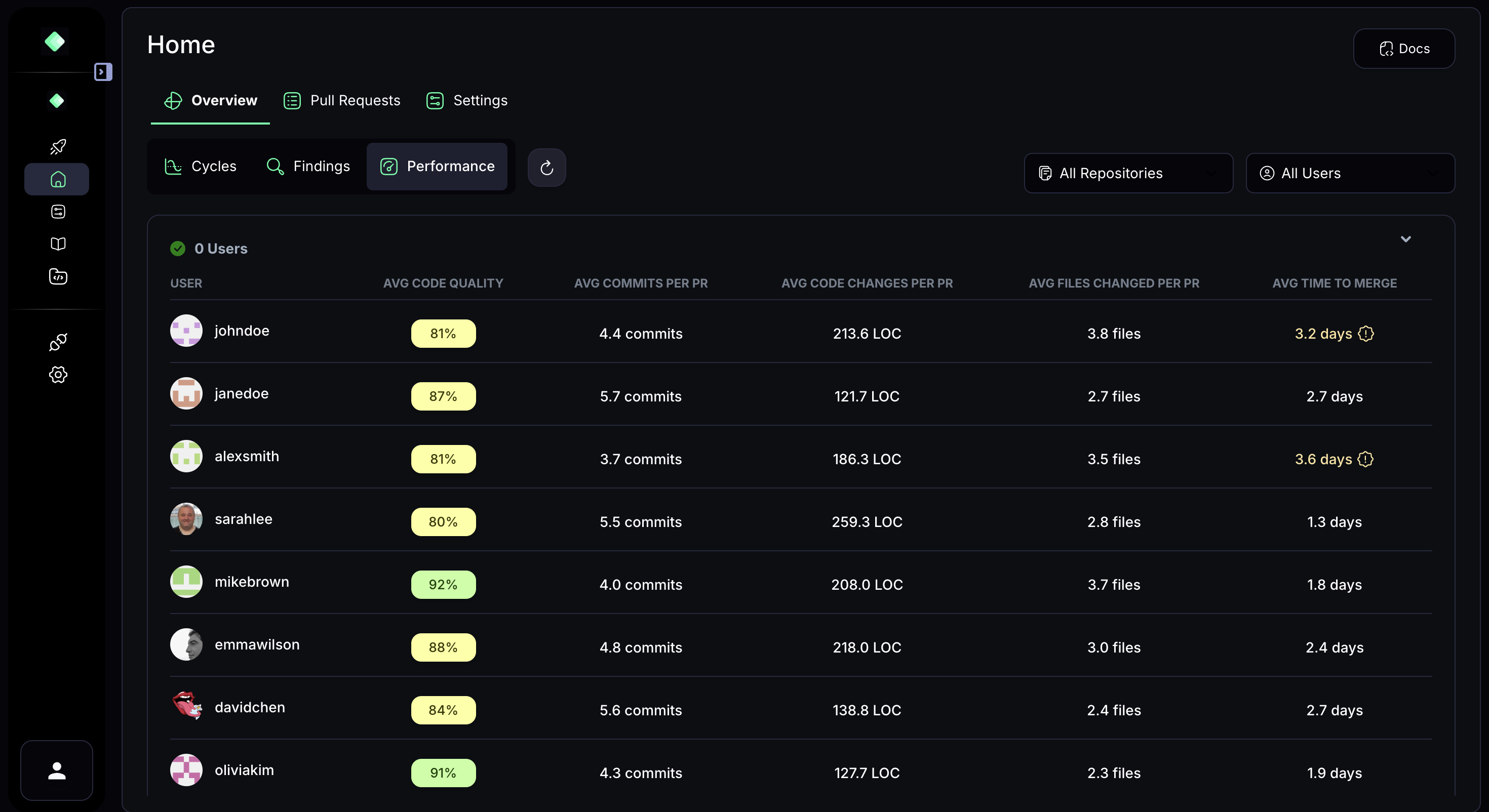
MatterAI provides detailed metrics on individual developer performance to help identify strengths and areas for improvement:
 ### Key Metrics
* **Average Code Quality**: A percentage score indicating the overall quality of code submitted by each developer
* **Average Commits per PR**: The typical number of commits each developer makes per pull request
* **Average Time to Merge**: How long it typically takes for a developer's PRs to be merged
### Benefits
* **Objective Feedback**: Provide developers with objective metrics on their code quality
* **Identify Mentoring Opportunities**: Pair developers who excel in certain areas with those who could use improvement
* **Fair Performance Reviews**: Use data-driven insights during performance reviews
* **Developer Growth**: Track improvement in metrics over time to demonstrate growth
## Filtering and Customization
All analytics in MatterAI can be filtered by:
* **Repository**: View metrics for specific repositories or all repositories
* **User**: Focus on individual developers or the entire team
* **Time Period**: Analyze trends over different time periods
## Impact on Engineering Teams
MatterAI's analytics provide several key benefits for engineering teams:
### 1. Data-Driven Decision Making
Rather than relying on intuition, teams can make decisions based on concrete data about their development processes, code quality, and team performance.
### 2. Improved Code Quality
By tracking issues by category and monitoring fix rates, teams can systematically improve their codebase quality over time.
### 3. Enhanced Developer Experience
Developers receive objective feedback on their code and can track their improvement over time, leading to greater job satisfaction and professional growth.
### 4. Increased Productivity
Identifying bottlenecks in the PR review process allows teams to optimize their workflows and ship code faster.
### 5. Better Resource Allocation
Understanding where issues are concentrated helps teams allocate resources more effectively to address the most critical problems.
### 6. Measurable Improvement
Teams can set specific goals for metrics like PR cycle time or issue resolution and track their progress toward these goals.
## Getting Started with Analytics
To access MatterAI analytics:
1. Navigate to the **Home** section in your MatterAI dashboard
2. Select the **Overview** tab to see high-level metrics
3. Use the tabs for **Cycles**, **Findings**, and **Performance** to dive deeper into specific analytics
4. Apply filters as needed to focus on specific repositories, users, or time periods
All analytics data is updated in real-time as new pull requests are created, reviewed, and merged.
### Key Metrics
* **Average Code Quality**: A percentage score indicating the overall quality of code submitted by each developer
* **Average Commits per PR**: The typical number of commits each developer makes per pull request
* **Average Time to Merge**: How long it typically takes for a developer's PRs to be merged
### Benefits
* **Objective Feedback**: Provide developers with objective metrics on their code quality
* **Identify Mentoring Opportunities**: Pair developers who excel in certain areas with those who could use improvement
* **Fair Performance Reviews**: Use data-driven insights during performance reviews
* **Developer Growth**: Track improvement in metrics over time to demonstrate growth
## Filtering and Customization
All analytics in MatterAI can be filtered by:
* **Repository**: View metrics for specific repositories or all repositories
* **User**: Focus on individual developers or the entire team
* **Time Period**: Analyze trends over different time periods
## Impact on Engineering Teams
MatterAI's analytics provide several key benefits for engineering teams:
### 1. Data-Driven Decision Making
Rather than relying on intuition, teams can make decisions based on concrete data about their development processes, code quality, and team performance.
### 2. Improved Code Quality
By tracking issues by category and monitoring fix rates, teams can systematically improve their codebase quality over time.
### 3. Enhanced Developer Experience
Developers receive objective feedback on their code and can track their improvement over time, leading to greater job satisfaction and professional growth.
### 4. Increased Productivity
Identifying bottlenecks in the PR review process allows teams to optimize their workflows and ship code faster.
### 5. Better Resource Allocation
Understanding where issues are concentrated helps teams allocate resources more effectively to address the most critical problems.
### 6. Measurable Improvement
Teams can set specific goals for metrics like PR cycle time or issue resolution and track their progress toward these goals.
## Getting Started with Analytics
To access MatterAI analytics:
1. Navigate to the **Home** section in your MatterAI dashboard
2. Select the **Overview** tab to see high-level metrics
3. Use the tabs for **Cycles**, **Findings**, and **Performance** to dive deeper into specific analytics
4. Apply filters as needed to focus on specific repositories, users, or time periods
All analytics data is updated in real-time as new pull requests are created, reviewed, and merged.