> ## Documentation Index
> Fetch the complete documentation index at: https://docs.matterai.so/llms.txt
> Use this file to discover all available pages before exploring further.
# Automated Code Fixes
> Learn how to automatically generate and apply code fixes for MatterAI review comments
Automated Code Fixes is available on all plans.
This guide walks you through the automated code fix capabilities of MatterAI, which eliminates manual copy-pasting by automatically generating fix PRs for review comments.
## What are Automated Code Fixes?
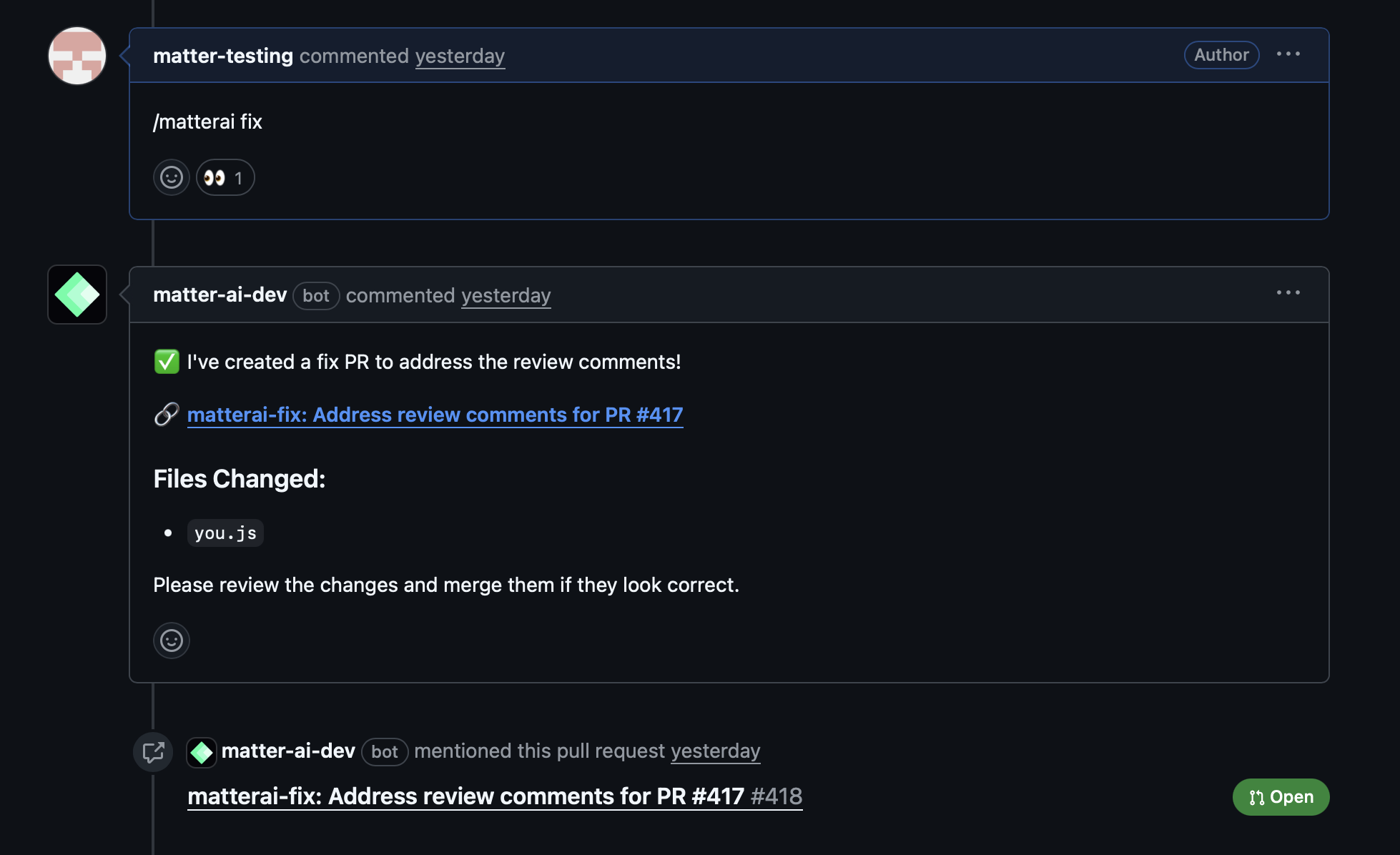
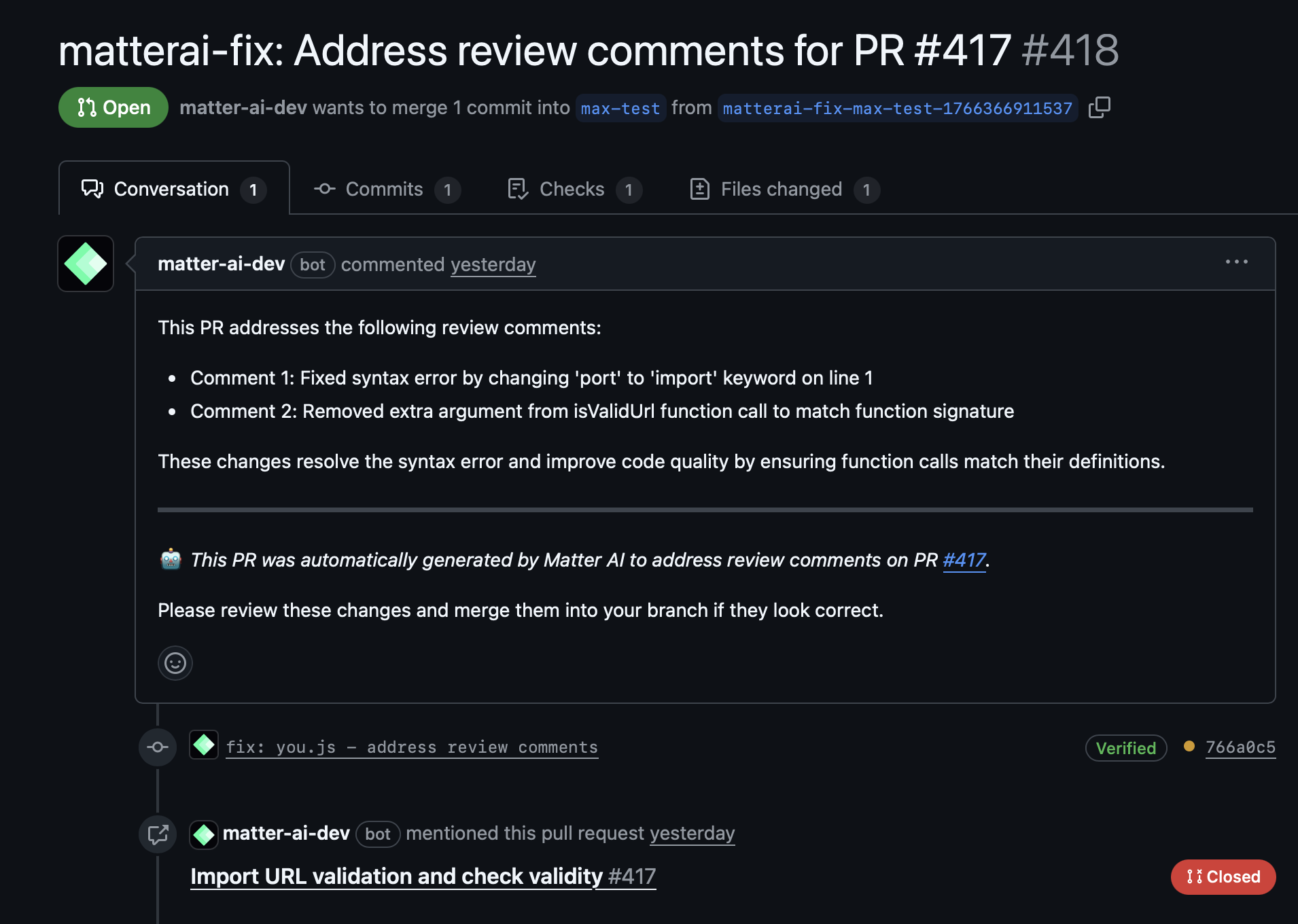
The `/matter fix` command automatically generates a fix PR that addresses all review comments from Matter AI. No manual copy-pasting needed - the AI analyzes your code and creates precise fixes in a separate branch for safe review.
## How It Works
### 1. Fetch Review Comments
* Retrieves all Matter AI review comments from the current PR
* Analyzes the context and suggestions provided
* Identifies actionable fixes that can be automated
### 2. Generate Precise Fixes
* Analyzes the codebase to understand the current implementation
* Generates exact code changes based on review suggestions
* Ensures fixes align with your project's coding standards
* Maintains code functionality while applying improvements
### 3. Create Fix Branch
* Creates a new branch specifically for the automated fixes
* Applies all generated fixes to the new branch
* Ensures no direct commits to your original branch
### 4. Open Fix PR
* Opens a new Pull Request targeting your original branch
* Includes detailed description of all fixes applied
* Provides clear commit history for easy review
## Benefits
### Time Savings
* **15-30 minutes saved per PR**: No more manual copy-pasting of suggestions
* **Instant application**: Fixes are applied immediately after generation
* **Batch processing**: Handles multiple review comments simultaneously
### Accuracy Improvements
* **Eliminates manual errors**: No risk of typos or incorrect applications
* **Consistent application**: All fixes follow the same standards
* **Context-aware**: Understands your specific codebase structure
### Safety Features
* **Separate branch creation**: Original PR remains untouched
* **Reviewable changes**: All fixes can be reviewed before merging
* **GitHub integration**: Works seamlessly with your existing workflow
## How to Use
1. **Get Matter AI reviews**: First, use any Matter AI review command (`/matter review`, `/matter review-max`, `/matter review-full`)
2. **Trigger automated fixes**: Comment on the PR with `/matter fix` or `@matterai fix`
3. **Review the fix PR**: Examine the automatically generated Pull Request
4. **Merge when ready**: Merge the fix PR once you're satisfied with the changes
## Example Workflow
 ## Supported Review Types
Automated fixes work with all Matter AI review commands:
* **`/matter review`**: Basic code review suggestions
* **`/matter review-max`**: Advanced AI analysis with tool-use
* **`/matter review-full`**: Complete PR analysis
* **Any combination**: Mix and match review types before using fixes
## What Gets Fixed
The automated system can handle various types of code improvements:
### Code Quality Issues
* Formatting and style improvements
* Naming convention corrections
* Code structure optimizations
### Performance Optimizations
* Inefficient loop improvements
* Memory usage optimizations
* Algorithm enhancements
### Security Improvements
* Input validation additions
* Security best practice implementations
* Vulnerability patches
### Bug Fixes
* Logic error corrections
* Edge case handling
* Exception management improvements
## Safety & Security
### Branch Isolation
* **Separate branch**: Fixes are applied to a new branch, not your working branch
* **No force pushes**: Your original commits remain unchanged
* **Clean history**: Fixes are organized in logical commits
### Review Process
* **All changes reviewable**: Every fix can be examined before merging
* **Detailed descriptions**: Each fix includes explanation of what was changed
* **Rollback capability**: Easy to revert if needed
### Code Privacy
* **Repository stays private**: No code leaves your GitHub repository
* **Secure processing**: All analysis happens within GitHub's secure environment
* **Access control**: Respects your repository's permission settings
## Best Practices
### Before Using Automated Fixes
1. **Review all comments**: Read through all Matter AI review comments first
2. **Understand the changes**: Make sure you agree with the suggested improvements
3. **Check confidence scores**: Focus on high-confidence fixes first
### After Fix Generation
1. **Review the PR carefully**: Examine all changes in the generated PR
2. **Run tests**: Ensure all automated fixes pass your test suite
3. **Verify functionality**: Confirm the fixes don't break existing features
### When NOT to Use
* **Complex architectural changes**: Manual review needed for major structural changes
* **Business logic modifications**: Human review required for logic changes
* **Experimental features**: When you're unsure about the proposed improvements
## Troubleshooting
### Common Issues
* **No review comments found**: Ensure you've run a Matter AI review command first
* **Fixes not applicable**: Some suggestions may require manual intervention
* **Merge conflicts**: The fix PR may have conflicts with recent changes
### Getting Help
* **Ask for clarification**: Use `/matter ` to ask about specific fixes
* **Request manual review**: For complex changes, ask for human review
* **Provide context**: Include relevant information about your specific use case
## Integration with Development Workflow
Automated fixes integrate seamlessly with standard development practices:
* **CI/CD integration**: Fix PRs can trigger your normal CI pipeline
* **Code review process**: Treat fix PRs like any other code review
* **Team collaboration**: Team members can review and approve automated fixes
* **Documentation updates**: Include documentation changes in the automated process
## Supported Review Types
Automated fixes work with all Matter AI review commands:
* **`/matter review`**: Basic code review suggestions
* **`/matter review-max`**: Advanced AI analysis with tool-use
* **`/matter review-full`**: Complete PR analysis
* **Any combination**: Mix and match review types before using fixes
## What Gets Fixed
The automated system can handle various types of code improvements:
### Code Quality Issues
* Formatting and style improvements
* Naming convention corrections
* Code structure optimizations
### Performance Optimizations
* Inefficient loop improvements
* Memory usage optimizations
* Algorithm enhancements
### Security Improvements
* Input validation additions
* Security best practice implementations
* Vulnerability patches
### Bug Fixes
* Logic error corrections
* Edge case handling
* Exception management improvements
## Safety & Security
### Branch Isolation
* **Separate branch**: Fixes are applied to a new branch, not your working branch
* **No force pushes**: Your original commits remain unchanged
* **Clean history**: Fixes are organized in logical commits
### Review Process
* **All changes reviewable**: Every fix can be examined before merging
* **Detailed descriptions**: Each fix includes explanation of what was changed
* **Rollback capability**: Easy to revert if needed
### Code Privacy
* **Repository stays private**: No code leaves your GitHub repository
* **Secure processing**: All analysis happens within GitHub's secure environment
* **Access control**: Respects your repository's permission settings
## Best Practices
### Before Using Automated Fixes
1. **Review all comments**: Read through all Matter AI review comments first
2. **Understand the changes**: Make sure you agree with the suggested improvements
3. **Check confidence scores**: Focus on high-confidence fixes first
### After Fix Generation
1. **Review the PR carefully**: Examine all changes in the generated PR
2. **Run tests**: Ensure all automated fixes pass your test suite
3. **Verify functionality**: Confirm the fixes don't break existing features
### When NOT to Use
* **Complex architectural changes**: Manual review needed for major structural changes
* **Business logic modifications**: Human review required for logic changes
* **Experimental features**: When you're unsure about the proposed improvements
## Troubleshooting
### Common Issues
* **No review comments found**: Ensure you've run a Matter AI review command first
* **Fixes not applicable**: Some suggestions may require manual intervention
* **Merge conflicts**: The fix PR may have conflicts with recent changes
### Getting Help
* **Ask for clarification**: Use `/matter ` to ask about specific fixes
* **Request manual review**: For complex changes, ask for human review
* **Provide context**: Include relevant information about your specific use case
## Integration with Development Workflow
Automated fixes integrate seamlessly with standard development practices:
* **CI/CD integration**: Fix PRs can trigger your normal CI pipeline
* **Code review process**: Treat fix PRs like any other code review
* **Team collaboration**: Team members can review and approve automated fixes
* **Documentation updates**: Include documentation changes in the automated process