

Automated Code Fixes is available on all plans.
What are Automated Code Fixes?
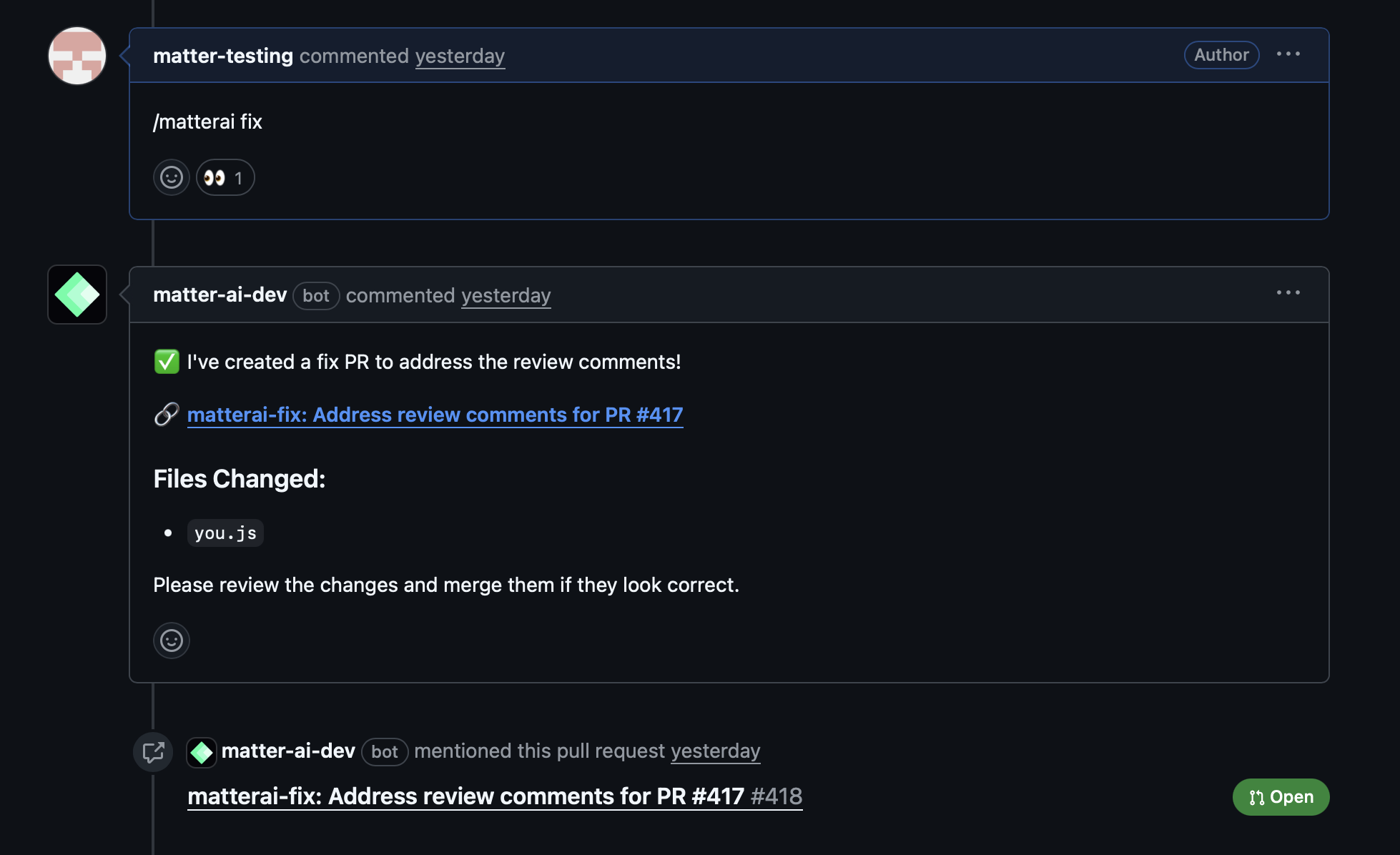
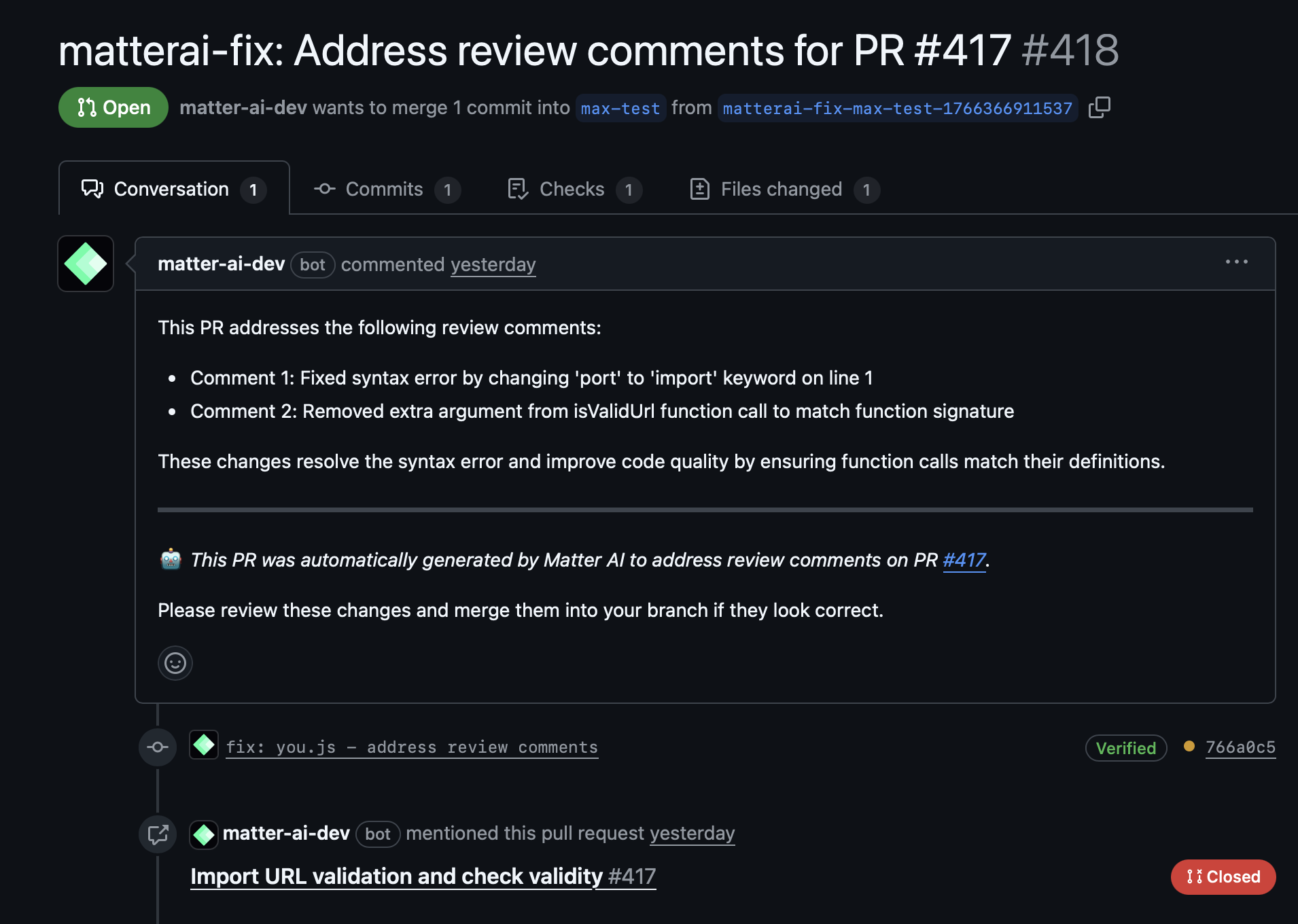
The/matter fix command automatically generates a fix PR that addresses all review comments from Matter AI. No manual copy-pasting needed - the AI analyzes your code and creates precise fixes in a separate branch for safe review.
How It Works
1. Fetch Review Comments
- Retrieves all Matter AI review comments from the current PR
- Analyzes the context and suggestions provided
- Identifies actionable fixes that can be automated
2. Generate Precise Fixes
- Analyzes the codebase to understand the current implementation
- Generates exact code changes based on review suggestions
- Ensures fixes align with your project’s coding standards
- Maintains code functionality while applying improvements
3. Create Fix Branch
- Creates a new branch specifically for the automated fixes
- Applies all generated fixes to the new branch
- Ensures no direct commits to your original branch
4. Open Fix PR
- Opens a new Pull Request targeting your original branch
- Includes detailed description of all fixes applied
- Provides clear commit history for easy review
Benefits
Time Savings
- 15-30 minutes saved per PR: No more manual copy-pasting of suggestions
- Instant application: Fixes are applied immediately after generation
- Batch processing: Handles multiple review comments simultaneously
Accuracy Improvements
- Eliminates manual errors: No risk of typos or incorrect applications
- Consistent application: All fixes follow the same standards
- Context-aware: Understands your specific codebase structure
Safety Features
- Separate branch creation: Original PR remains untouched
- Reviewable changes: All fixes can be reviewed before merging
- GitHub integration: Works seamlessly with your existing workflow
How to Use
- Get Matter AI reviews: First, use any Matter AI review command (
/matter review,/matter review-max,/matter review-full) - Trigger automated fixes: Comment on the PR with
/matter fixor@matterai fix - Review the fix PR: Examine the automatically generated Pull Request
- Merge when ready: Merge the fix PR once you’re satisfied with the changes
Example Workflow
Supported Review Types
Automated fixes work with all Matter AI review commands:/matter review: Basic code review suggestions/matter review-max: Advanced AI analysis with tool-use/matter review-full: Complete PR analysis- Any combination: Mix and match review types before using fixes
What Gets Fixed
The automated system can handle various types of code improvements:Code Quality Issues
- Formatting and style improvements
- Naming convention corrections
- Code structure optimizations
Performance Optimizations
- Inefficient loop improvements
- Memory usage optimizations
- Algorithm enhancements
Security Improvements
- Input validation additions
- Security best practice implementations
- Vulnerability patches
Bug Fixes
- Logic error corrections
- Edge case handling
- Exception management improvements
Safety & Security
Branch Isolation
- Separate branch: Fixes are applied to a new branch, not your working branch
- No force pushes: Your original commits remain unchanged
- Clean history: Fixes are organized in logical commits
Review Process
- All changes reviewable: Every fix can be examined before merging
- Detailed descriptions: Each fix includes explanation of what was changed
- Rollback capability: Easy to revert if needed
Code Privacy
- Repository stays private: No code leaves your GitHub repository
- Secure processing: All analysis happens within GitHub’s secure environment
- Access control: Respects your repository’s permission settings
Best Practices
Before Using Automated Fixes
- Review all comments: Read through all Matter AI review comments first
- Understand the changes: Make sure you agree with the suggested improvements
- Check confidence scores: Focus on high-confidence fixes first
After Fix Generation
- Review the PR carefully: Examine all changes in the generated PR
- Run tests: Ensure all automated fixes pass your test suite
- Verify functionality: Confirm the fixes don’t break existing features
When NOT to Use
- Complex architectural changes: Manual review needed for major structural changes
- Business logic modifications: Human review required for logic changes
- Experimental features: When you’re unsure about the proposed improvements
Troubleshooting
Common Issues
- No review comments found: Ensure you’ve run a Matter AI review command first
- Fixes not applicable: Some suggestions may require manual intervention
- Merge conflicts: The fix PR may have conflicts with recent changes
Getting Help
- Ask for clarification: Use
/matter <question>to ask about specific fixes - Request manual review: For complex changes, ask for human review
- Provide context: Include relevant information about your specific use case
Integration with Development Workflow
Automated fixes integrate seamlessly with standard development practices:- CI/CD integration: Fix PRs can trigger your normal CI pipeline
- Code review process: Treat fix PRs like any other code review
- Team collaboration: Team members can review and approve automated fixes
- Documentation updates: Include documentation changes in the automated process